The Z80 core is now a bit more accurate - ZEXALL still reports a lot of glitches, and this is even a specially modified version of ZEXALL that masks out the two undocumented flags.
The VDP (Video Display Processor - the graphics hardware) has been given an overhaul and is now slightly more accurate. A lot more software runs now. I have also hacked in my PSG emulator (that's the sound chip) from my VGM player. It's not timed correctly (as nothing is!) but it's good enough for testing.
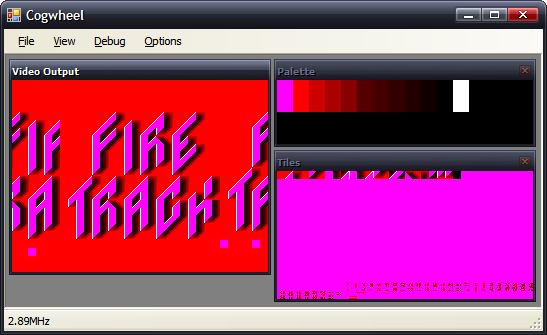
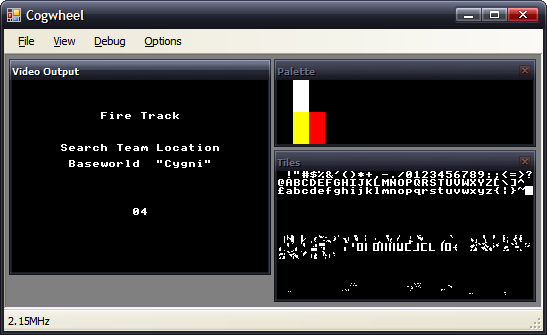
Picohertz, the demo I have been working on (on and off) now runs correctly. The hole in the Y in the second screenshot is caused by the 8 sprite per scanline limit. The first screenshot shows off sprite zooming (whereby each sprite is zoomed to 200% the original size). The background plasma is implemented as a palette shifting trick.
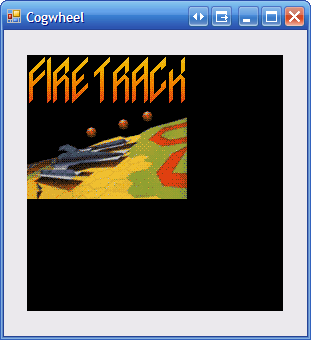
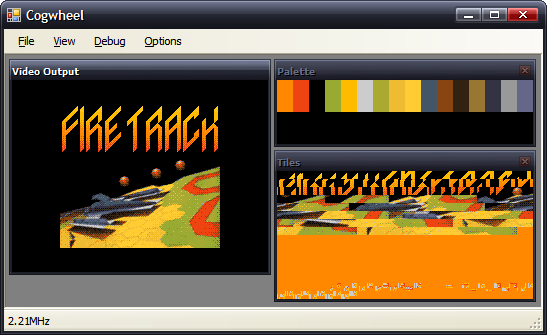
Fire Track runs and is fully playable. The second shot shows a raster effect (changing the horizontal scroll offset on each scanline.
Seeing as I understand the instructions that my programs use (and the results of them), and have my own understanding of parts of the hardware, it's not really surprising that the programs I've written work perfectly, but ones written by others don't, as they might (and often do) rely on tricks and results that I'm not aware of, or on hardware that I haven't implemented accurately enough. At least I do not need to emulate any sort of OS to run these programs!
SMS Power! has been an amazing resource in terms of hardware documentation and homebrew ROMs. I've been using the entries to the 2006 coding competition to test the emulator.
Bock's game, KunKun & KokoKun, nearly works. The cannon don't fire, which would make the game rather easy if it wasn't for the fact that the switch to open the door doesn't work either. I suspect that a CPU flag isn't being set correctly as the result to an operation somewhere.
Haroldoop's PongMaster is especially interesting as it was not written in Z80 assembly, but C. It's also one of the silkiest-smooth pong games I've come across.
An!mal/furrtek's Paws runs, but something means that the effect doesn't work correctly (the 'wavy' bit should only have one full wave in it, not two - it appears my implementation of something doubles the frequency of the wave). The music sounds pretty good, though.
Sega's Columns gets the furthest of any official software - the Sega logo fades in then out.
I do like the idea that Sega is an ENTERPIεS. (From the Game Gear BIOS). (I believe this is a CPU bug).
Charles Doty's Frogs is a bit of a conundrum. The right half of the second frog is missing due to the 8 sprites per scanline limitation of the VDP. However, Meka, Emukon, Dega and now my emulator draw the rightmost frog's tongue (and amount if it showing) differently, as well as whether the frog is sitting or leaping. There's a lot of source for such a static program (it doesn't do anything in any emulator I've tried it on, nor on hardware). Dega is by far the strangest, as the tongue moves in and out rapidly. I'm really not sure what's meant to be happening here.
Here are the results of ZEXALL so far.
Z80 instruction exerciser

ld hl,(nnnn).................OK
ld sp,(nnnn).................OK
ld (nnnn),hl.................OK
ld (nnnn),sp.................OK
ld <bc,de>,(nnnn)............OK
ld <ix,iy>,(nnnn)............OK
ld <ix,iy>,nnnn..............OK
ld (<ix,iy>+1),nn............OK
ld <ixh,ixl,iyh,iyl>,nn......OK
ld a,(nnnn) / ld (nnnn),a....OK
ldd<r> (1)...................OK
ldd<r> (2)...................OK
ldi<r> (1)...................OK
ldi<r> (2)...................OK
ld a,<(bc),(de)>.............OK
ld (nnnn),<ix,iy>............OK
ld <bc,de,hl,sp>,nnnn........OK
ld <b,c,d,e,h,l,(hl),a>,nn...OK
ld (nnnn),<bc,de>............OK
ld (<bc,de>),a...............OK
ld (<ix,iy>+1),a.............OK
ld a,(<ix,iy>+1).............OK
shf/rot (<ix,iy>+1)..........OK
ld <h,l>,(<ix,iy>+1).........OK
ld (<ix,iy>+1),<h,l>.........OK
ld <b,c,d,e>,(<ix,iy>+1).....OK
ld (<ix,iy>+1),<b,c,d,e>.....OK
<inc,dec> c..................OK
<inc,dec> de.................OK
<inc,dec> hl.................OK
<inc,dec> ix.................OK
<inc,dec> iy.................OK
<inc,dec> sp.................OK
<set,res> n,(<ix,iy>+1)......OK
bit n,(<ix,iy>+1)............OK
<inc,dec> a..................OK
<inc,dec> b..................OK
<inc,dec> bc.................OK
<inc,dec> d..................OK
<inc,dec> e..................OK
<inc,dec> h..................OK
<inc,dec> l..................OK
<inc,dec> (hl)...............OK
<inc,dec> ixh................OK
<inc,dec> ixl................OK
<inc,dec> iyh................OK
<inc,dec> iyl................OK
ld <bcdehla>,<bcdehla>.......OK
cpd<r>.......................OK
cpi<r>.......................OK
<inc,dec> (<ix,iy>+1)........OK
<rlca,rrca,rla,rra>..........OK
shf/rot <b,c,d,e,h,l,(hl),a>.OK
ld <bcdexya>,<bcdexya>.......OK
<rrd,rld>....................OK
<set,res> n,<bcdehl(hl)a>....OK
neg..........................OK
add hl,<bc,de,hl,sp>.........OK
add ix,<bc,de,ix,sp>.........OK
add iy,<bc,de,iy,sp>.........OK
aluop a,nn...................   CRC:04d9a31f expected:48799360
<adc,sbc> hl,<bc,de,hl,sp>...   CRC:2eaa987f expected:f39089a0
bit n,<b,c,d,e,h,l,(hl),a>...OK
<daa,cpl,scf,ccf>............   CRC:43c2ed53 expected:9b4ba675
aluop a,(<ix,iy>+1)..........   CRC:a7921163 expected:2bc2d52d
aluop a,<ixh,ixl,iyh,iyl>....   CRC:c803aff7 expected:a4026d5a
aluop a,<b,c,d,e,h,l,(hl),a>.   CRC:60323322 expected:5ddf949b
Tests complete
The aluop (add/adc/sub/sbc/and/xor/or/cp) bug seems to be related to the parity/overflow flag (all other documented flags seem to be generating the correct CRC). daa hasn't even been written yet, so that would be the start of the problems with the daa,cpl,scf,ccf group. adc and sbc bugs are probably related to similar bugs as the aluop instructions.
The biggest risk is that my implementation is so broken it can't detect the CRCs correctly. I'd hope not.
In terms of performance; when running ZEXALL, a flags-happy program, I get about ~60MHz speed in Release mode on a 2.4GHz Pentium 4. When ZEXALL is finished, and it's just looping around on itself, I get ~115MHz.
The emulator has not been programmed in an efficient manner, rather a simple and clear manner. All memory access is done by something that implements the IMemoryDevice controller (with two methods - byte ReadByte(ushort address) and void WriteByte(ushort address, byte data)) and all hardware access is done by something that implements the IHardwareController interface (also exposing two methods - byte ReadDevice(byte port) and void WriteDevice(byte port, byte data)).
Most of the Z80's registers can be accessed via an index which makes up part of an opcode. You'd have thought that the easiest way to represent this would be, of course, an array. However, it's not so simple - one of the registers, index 6, is (HL) - which means "whatever HL is pointing to". I've therefore implemented this with two methods - byte GetRegister(int index) and void SetRegister(int index, byte value).
Life isn't even that simple, though, as by inserting a prefix in front of the opcode you can change the behaviour of the CPU - instead of using HL, it'll use either IX or IY, two other registers. In the case of (HL) it becomes even hairier - it'll not simply substitute in (IX) or (IY), it'll substitute in (IX+d), where d is a signed displacement byte that is inserted after the original opcode.
To sort this out, I have three RegisterCollections - one that controls the "normal" registers (with HL), one for IX and one for IY. After each opcode and prefix is decoded, a variable is set to make sure that the ensuing code to handle each instruction works on the correct RegisterCollection.
The whole emulator is implemented in this simplified and abstracted manner - so I'm not too upset with such lousy performance.
I'm really not sure how to implement timing in the emulator. There's the easy timing, and the not-so-easy timing.
The easy timing relates the VDP speed. On an NTSC machine that generates 262 scanlines (60Hz), on a PAL machine that generates 313 scanlines (50Hz). That's 15720 or 15650 scanlines per second respectively.
According to the official Game Gear manual, the CPU clock runs at 3.579545MHz. I don't know if this differs with the SMS, or whether it's different on NTSC or PAL devices (the Game Gear is fixed to NTSC, as it never needs to output to a TV, having an internal LCD).
I interpret this as meaning that the CPU needs to be run for 227.7 or 228.7 cycles per scanline. That way, my main loop looks a bit like this:
if (Hardware.VDP.VideoStandard == VideoStandardType.NTSC) {
    for (int i = 0; i < 262; ++i) {
        CPU.FetchExecute(228);
        Hardware.VDP.RasteriseLine();
    }
} else {
    for (int i = 0; i < 313; ++i) {
        CPU.FetchExecute(229);
        Hardware.VDP.RasteriseLine();
    }
}
The VDP raises an
event when it enters the vertical blank area, so the interface can capture this and so present an updated frame.
The timing is therefore tied to the refresh rate of the display.
Here's the fictional Super Game Gear, breezing along at 51MHz. The game runs just as smoothly as it would at 3MHz, though - as the game's timing is tied to waiting for the vertical blank.
Actually, I tell a lie - as Fire Track polls the vertical counter, rather than waiting for an interrupt, it is possible for it to poll this counter so fast (at an increased clock rate) that it hasn't changed between checks. That way "simple" effects run extra fast, but the game (that has a lot of logic code) runs at the same rate.
This works. The problem is caused by sound.
With the video output, I have total control of the rasterisation. However, with sound, I have to contend with the PC's real hardware too! I'm using the most excellent FMOD Ex library, and a simple callback arrangement, whereby when it needs more data to output it requests some in a largish chunk.
If I emulate the sound hardware "normally", that is updating registers when the CPU asks them to be updated, by the time the callback is called they'll have changed a number of times and the granularity of sound updates will be abysmal.
A solution might be to have a render loop like this:
for (int i = 0; i < 313; ++i) {
    CPU.FetchExecute(229);
    Hardware.VDP.RasteriseLine();
    Hardware.PSG.RenderSomeSamples(1000);
}
However, this causes its own problems. I'd have to ensure that I was generating
exactly the correct number of samples - if I generated too few I'd end up with crackles and pops in the audio as I ran out of data when the callback requested some, or I'd end up truncating data (which would also crackle) if I generated too much.
My solution thus far has been a half-way-house - I buffer all PSG register updates to a Queue, logging the data written and how many CPU cycles had been executed overall when the write was attempted. This way, when the callback is run, I can run through the queued data, using the delay between writes to ensure I get a clean output.
As before, this has a problem if the timing isn't correct - rather than generate pops or crackles, it means that the music would play at an inconsistent rate.
Of course, the "best" solution would be to use some sort of latency-free audio solution - MIDI, for example, or ASIO. If I timed it, as with everything else, to scanlines I'd end up with a 64µs granularity - which is larger than a conventional 44.1kHz sample (23µs), so PWM sound might not work very well.
Incidentally, this is not the first emulator I have written - I have written the obligatory Chip-8 emulator, for TI-83 calculator and PC. Being into hardware, but not having the facilities to hand to dabble in hardware as much as I'd like to, an emulator provides a fun middle-ground between hardware and software.